
On this page
The most painful moment in any records product is immediately after creating your first company. You have told the software what your corporation is called, and now you stare at a dashboard. As expected, it's correct, but it is also completely empty. No share classes, directors, shareholders, certificates, or shares. All the functionality the platform will eventually help you with, is in front of you, and none of it is done yet.
This is the point where many well-intended records keepers quietly surrender. Not because the work is hard, but because they have no obvious place to start, or idea of what a complete set of records even looks like. This update is all about removing that moment.
The blank canvas problem
When it comes to keeping accurate corporate records, the goal is clear enough. The corporation should have its share structure defined, the people who govern it be recorded, its owners on the register, certificate signers in place, and its initial shares issued to reflect the cap table. In other words, it's "set up".
The issue wasn't that Ledger couldn't do any of this. It could, and still can, from each of its relevant areas. The problem was that a brand new user never knew that this was the list, or the order to do it in. You created a corporation, and now the records keeping is up to you to figure out, screen by screen, with no idea if you have done everything, or missed things that will come back later.
A blank canvas is a great freedom to an expert, but a daunting prospect to everyone else.
What setup used to look like
Creating a company only asked for a few bare essentials: a name, and a folder structure for its records. Both perfectly sensible, and quick to complete. Then the flow ended, and you were greeted to your new corporation's dashboard.
From here, everything else was a self-guided task. Defining share classes was one screen, adding directors and officers was another, followed by shareholders, certificate signers, and issuing the first shares. Nothing wrong with any of it, but they were disconnected, and failed to present themselves as steps in a larger process. The effect of this was many half-set-up corporations: a name and some empty folders, waiting for someone to know what to do next.
A guided path, in seven steps
Now, adding a corporation will open a guided setup that walks you through the entire process, step by step. Each screen does one job, shows you how far you have gotten, and passes you to the next. Seven steps from start to finish:
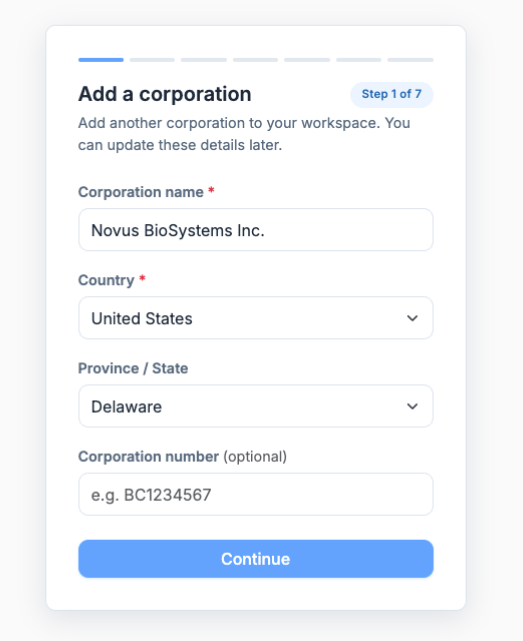
- Add the corporation. Its name, country, and corporation number. The starting point, as always.
- Choose a records structure. A comprehensive folder structure, or a streamlined default, so that the minute book has a place for everything right away.
- Create your share classes. The classes of shares your corporation is authorized to issue, along with their quantities, voting rights, par value, and certificate numbering.
- Add directors and officers. The people charged with governance and management, and the roles they hold.
- Add shareholders. The people and entities that will own the corporation, and thus hold shares.
- Set up certificate signatures. The people authorized to sign share certificates, including default signatories, captured by drawing or upload.
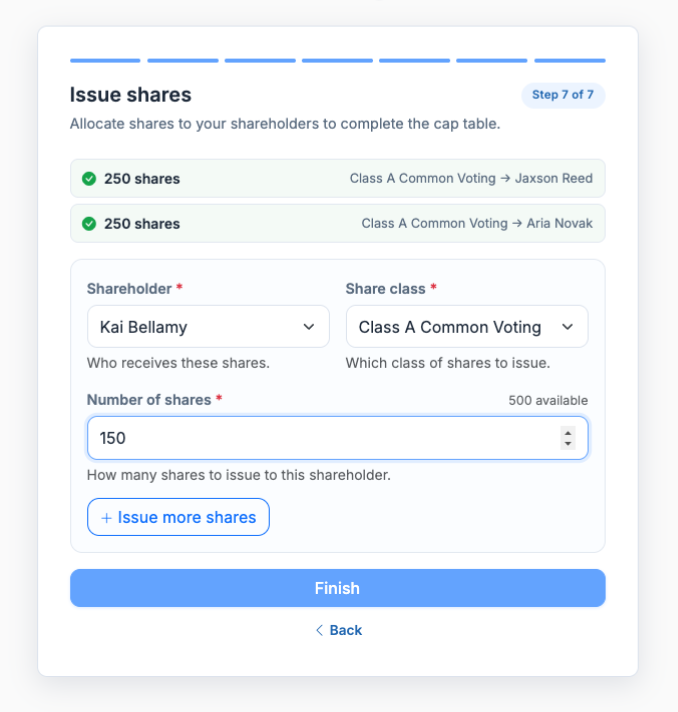
- Issue shares. The allocation of shares to your shareholders, finalizing the cap table.
And with that, the corporation is no longer just a name. Its structure is defined, its people accounted for, its ownership secured, and its records prepared. The books are organized, in the right place, in the right order, because they were built that way.
Nothing gets entered twice
Because the setup process is inherently cumulative, the information you've already provided feeds into the next steps. A shareholder you've added is suggested as an option when allocating shares. People, share classes, and folder structures you've defined appear as options rather than requiring new input, reducing the possibility of error or of alternative entries for the same purpose appearing elsewhere.
That's important in ways that go beyond convenience; duplicate records are a frequent cause of a cap table and corporate records getting out of sync. By reusing existing entries as much as possible, the records retain that single source of truth all the way from creation.
Skip a step, come back later
Guided doesn't mean required. Not every corporation needs all the information requested at all steps, and some details might not be immediately available. Any step can be skipped, and the setup process paused and resumed as needed. If you want to forgo guided setup entirely, you can always configure everything manually from the corporation's pages, as before.
The guidance is there to help, but you're always in control of the process and able to change the order of operations as needed.
Pick up where you left off
When you do return to a partially-completed setup, the corporation's overview page makes finding your progress effortless. It shows you how many of the 7 steps have been completed, and provides a Continue setup button that returns you to the process and the next applicable action. Your progress is made obvious, replacing the intimidating blank slate with a concrete todo list.
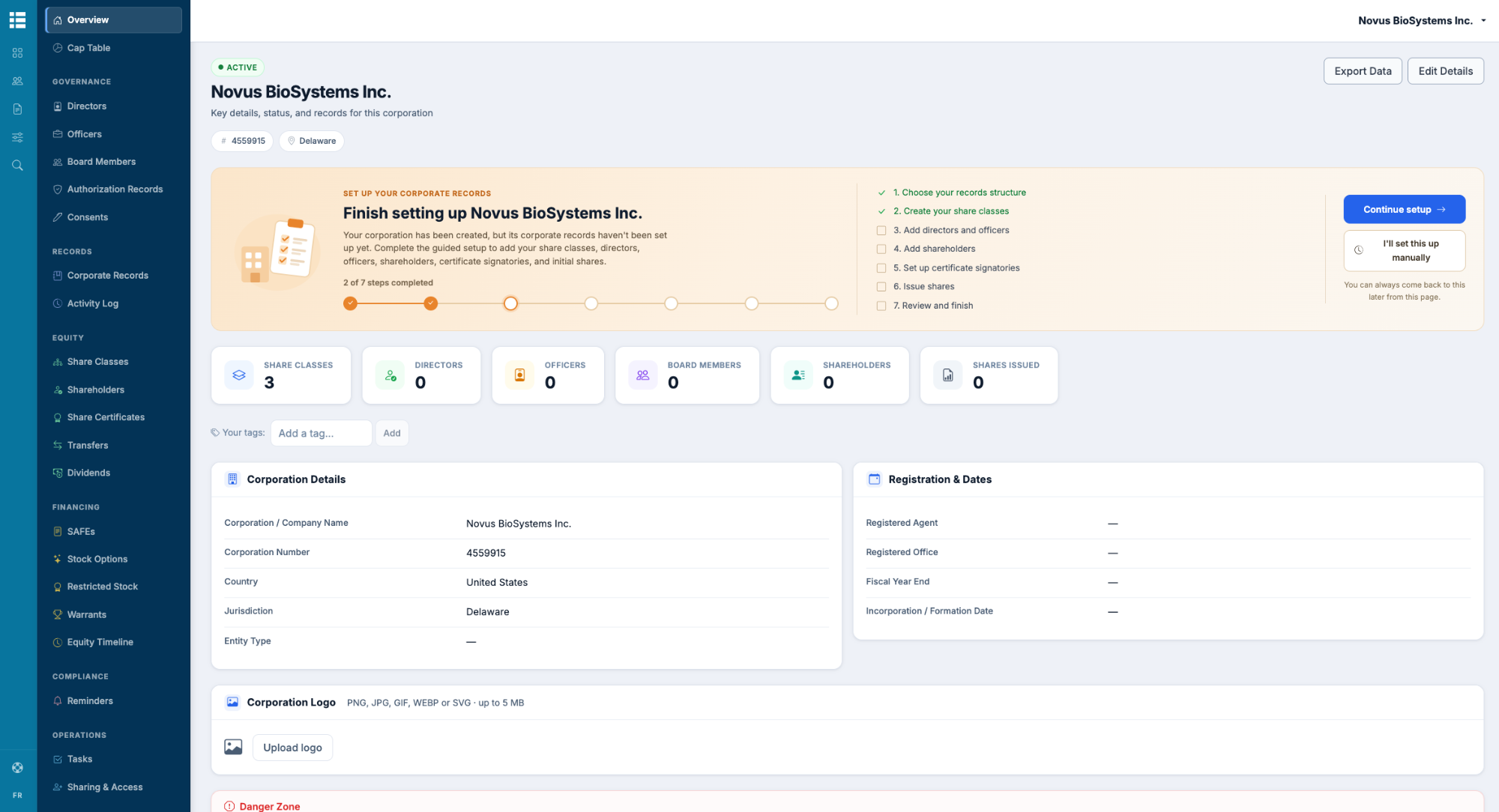
That means that even the most minimally-guided of users - say, someone who creates a corporation, gets pulled away, and returns to it a week later - will always have clear direction on what they can do next.
What it means for getting started
The value of a system of record is defined by the completeness and consistency of its records. A corporation with just a name and no other information is barely a corporation at all. By turning the initial configuration into a guided process, this update makes it easier to ensure that new corporations are actually populated with useful information, in an orderly manner, from day one.
- You know what's expected: The 7-step process demarcates what needs to be done to configure a corporation, providing a clear sense of completion.
- You do it in the right order: The steps are sequential; shares can't be issued before they've been created, and people can't sign certificates before they've been added. The records are consistent by design.
- You avoid duplication: Entering information once unlocks its reuse elsewhere, reducing the possibility of errors and ensuring a single source of truth.
- And you can always skip ahead or return later: The process respects your time and pace, providing a Continue setup button and guiding you through the steps at your leisure.
The bottom line
The point of getting started is to get going. Creating a corporation used to mean adding it to a blank ledger record, without guidance on what to do next. Now, it arrives with a roadmap: 7 steps to turn a blank name into a defined structure, with shareholders, directors and officers, issued shares, and more. Same records, better starting position - and if it means that the first 5 minutes with a new corporation no longer involve wondering what to do with it, this update has done its job.
See every product update as it's released in the changelog, and create a corporation with guided setup in Octelligence Ledger.