
On this page
Every share issuance on a cap table is a claim. This person holds these shares, because the corporation issued them to them. Most of the time nobody questions it. Then a financing, an acquisition or an audit comes along, and someone does.
This update is about being ready for that moment. Ledger now drafts the approval alongside the transaction, shows what every transaction still needs, and lets you follow an issuance from the cap table to the records that support it.
The diligence question
Your cap table records a share issuance. Can you quickly find the approval, the signed resolution and the certificate that support it?
For most private companies the honest answer is "eventually." The cap table lives in one place, resolutions in a folder, certificates in another, and nothing connects them. Each record may well exist, but answering the question means searching for it. A buyer's counsel asks it for every issuance on the register, which is why the cross-reference pass is where so much of diligence is spent.
Sometimes the search ends with nothing. An issuance without a board resolution is one of the findings that most often delays a closing. It rarely happens because anyone skipped the approval on purpose. It happens because the cap table was updated the day the shares went out, and the resolution was left for later. That is how the cap table and the corporate record drift apart.
Our view is simple: ownership is more useful when you can trace the records that support it. So we set out to make that tracing part of the everyday workflow, instead of an exercise you go through before a closing.
Start with approval
The easiest supporting record to find is one that was created together with the transaction. So approve first is now Ledger's default for share issuances, option grants, restricted stock, share transfers, SAFEs, warrants, dividends and share repurchases. When you record one of them, Ledger drafts the resolution approving it at the same time, for the directors, a sole director or the shareholders, whichever usually approves that kind of transaction. You can change who approves it and the date of the resolution before it is drafted.
Approve first is our workflow default, not a statement of what the law requires. Which body has to approve a transaction, and whether approval has to come before it, depends on your jurisdiction, your articles and any shareholder agreement. That is why every form still offers two other choices:
- Do it now, approve after. The transaction is recorded today and a resolution ratifying it is drafted.
- Already approved, or record the approval later. Nothing is drafted, and the transaction is listed as needing authorization until its approval is recorded.
Conversions work slightly differently. When a SAFE converts or a priced round closes, the conversion has already happened, so Ledger drafts one resolution ratifying the conversion and the shares it issues. Issuing to several holders at once works the same way as issuing to one: one batch, one resolution.
Approved, signed and completed are different steps
One reason supporting records go missing is that "approved" gets used for several different moments. In Ledger they are now separate steps, and each transaction shows which one it has reached.
- Drafted. The resolution exists and the transaction is pending. Nothing has been issued, granted or moved yet. A share certificate reads Pending authorization, and any PDF of it is stamped as a draft.
- Out for signature. The resolution has been sent to its signers, the directors by default, with a warning if one of them has been left out. The status shows how many signatures are still outstanding.
- Approved. Every signer has signed, and the resolution is adopted and filed in the minute book. Approval authorizes the transaction, but it does not carry it out.
- Completed. You complete the transaction from its approval: the shares are issued, the options granted, the transfer registered or the dividend declared. Until then, it stays pending.
An approval panel shows these steps for each transaction, with the one action that moves it forward: review and send the draft, manage signatures, or complete the issuance. You can also confirm an approval that was made outside Octelligence, for example at a meeting, and attach the evidence.
See what needs attention
Authorization Records is now a work queue. Every transaction that needs approval appears in one table, with search, filters by type and status, where its approval came from, and the next action to take. Summary cards at the top filter the list, and a Needs your action filter shows only the transactions waiting on you.
What matters most is that the status tells different situations apart, because each one needs a different response:
- Missing evidence. No approval is on record. This is a gap in the record, and it is fixed by adding evidence: prepare a new resolution, link one already in the minute book, upload a document that was signed elsewhere, or record a manual confirmation.
- Draft. A resolution has been prepared but not sent. If its document could not be generated, the row says so and offers to retry, instead of quietly hiding the option to send it.
- Awaiting signature. The resolution is out, and the row shows how many people have signed. The work is done, and the next move belongs to the signers.
- Pending validation. The resolution is signed and is waiting for you to review and validate it.
- Approved, or Evidence on file. Nothing more to do. You can open the approval or the record behind it.
A missing record and unfinished work can look the same in a spreadsheet. Here they no longer do. To clear several gaps at once, select the transactions and prepare a single resolution. One resolution covers one kind of transaction, and Ledger shows the recommended approving body, and notes when the transactions span several dates or are being approved after the fact.
Follow the connections
Connected Transaction Records, powered by Record Graph, answers the diligence question directly. Here is what it looks like for one share issuance.
You start from a table of every transaction that can be approved, each with its evidence status, and open the issuance. The page shows the issuance, represented by its share certificate, with the records connected to it: its authorization record, the resolution that approved it, the signature request that circulated the resolution, and the signed document. The approval chain only shows the steps this transaction actually went through, and every card opens the record itself, so the signed resolution is one click from the issuance it approved. If you prefer, a list view shows the same records, grouped by how each one relates to the transaction.
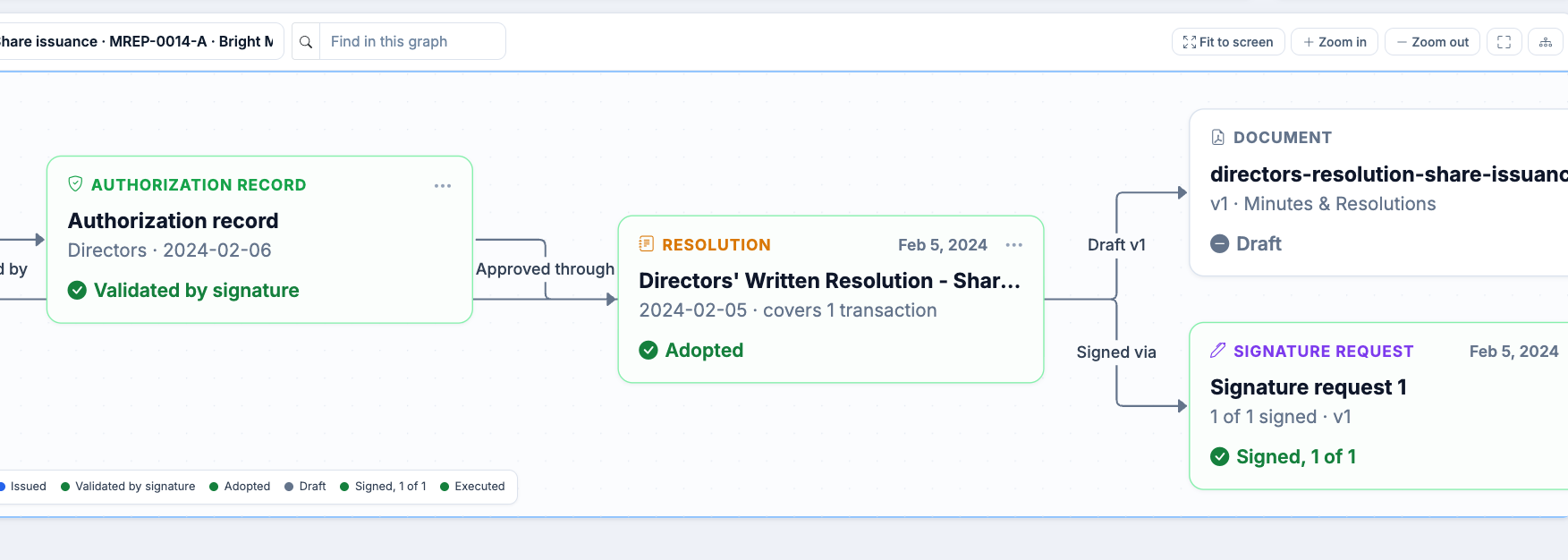
Above the graph, Ledger states what it found, in plain language. "Approved, signed in Octelligence" means the full chain is there. "Approved outside Octelligence, evidence attached" means the approval happened elsewhere but its document is on file. "Manually confirmed, no evidence attached" means someone vouched for the approval without a document behind it. "Approval evidence uncertain" is for cases that need a closer look, such as a signature request that completed against a different version of the resolution, and it comes with a recommended action. "Missing evidence" means there is no supporting record to find.
Some transactions inherit their support. A certificate issued when options are exercised, or one split off another certificate, is covered by what approved its parent, and Ledger says so rather than flagging a gap that isn't there.
The list of supporting records is available on every plan, opened from any transaction in Authorization Records. The graph view is included on Portfolio Professional and above.
What changes
- Less searching. The records that support a transaction are linked to it, so you no longer have to search across screens and folders to find them.
- Gaps show up early. A missing approval appears as a finding in Ledger, not as an item on counsel's diligence request list.
- Clear next steps. Each transaction says what it is waiting on, whether that is you, its signers or a missing document.
- The record stays in step with the cap table. When approval is drafted with the transaction, the two are created together instead of reconciled later.
Entity Relationships, also new this month, answers a different question. It shows how entities connect: who owns, runs and controls them. Connected Transaction Records shows how a transaction connects to its supporting records. We'll cover Entity Relationships in its own post.
The bottom line
A cap table tells you who owns what. The records behind it tell you why that ownership holds up. With approval drafted alongside each transaction, a queue that separates missing records from unfinished work, and a view that follows any issuance to its supporting records, that second question gets the same quick answer as the first. Ownership is more useful when you can trace the records that support it.
See every product update as it's released in the changelog, and trace your own transactions in Octelligence Ledger.