
- Plan
- Every plan
- Role
- Editor or above to record and approve transactions
- Applies to
- Corporations
The short version
- Equity transactions need approval, usually a resolution of the directors, and Octelligence keeps that approval with the transaction.
- By default a new transaction waits for its approval. Octelligence drafts the resolution, you send it for signature, and the transaction takes effect only when you complete it.
- You can instead put a transaction into effect straight away and approve it afterwards, or record an approval that has already happened.
- Signing the resolution doesn't put the transaction on the register by itself. Someone completes it, and the date they enter is the date it takes effect.
- Governance › Authorization Records lists every transaction and where its approval stands.
Which transactions this covers
The approval choice appears on the form whenever you create one of these:
- a share issuance, to one holder or to several at once;
- an option grant or a restricted stock award;
- a share transfer, or a repurchase of shares into treasury;
- a SAFE or a warrant;
- a dividend;
- a debt obligation.
Converting SAFEs, including Run Priced Round, is the exception: the conversion takes effect when you run it, and Octelligence drafts a resolution ratifying it.
The three choices
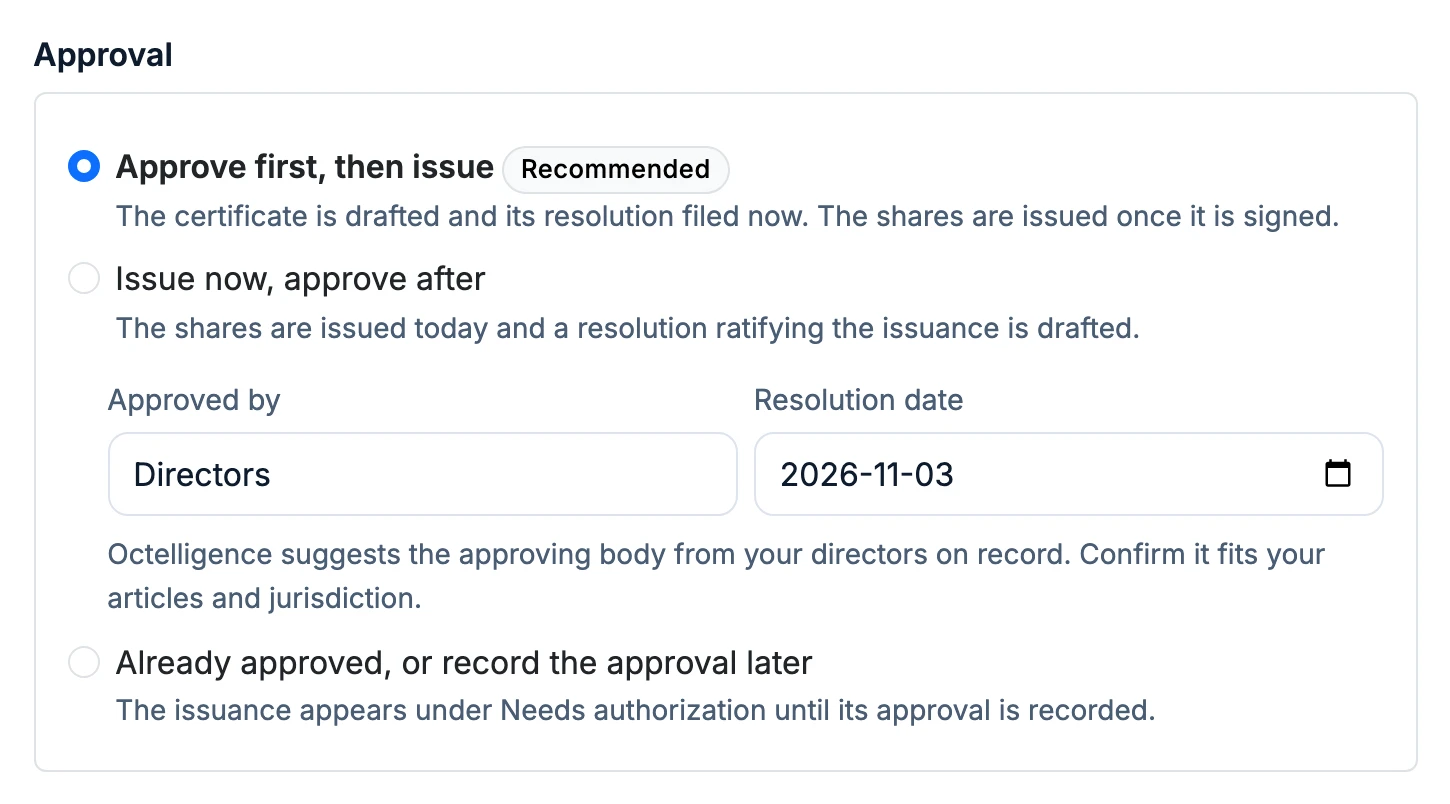
Each form has an Approval section with three options. The wording follows the transaction: an option grant says "Approve first, then grant", a transfer "Approve first, then register", a dividend "Approve first, then declare".
| Choice | What happens when you save | When the transaction takes effect |
|---|---|---|
| Approve first, then issue (the default) | The transaction is created as pending, and a written resolution approving it is drafted and filed in Corporate Records. | When you complete it, after the resolution is signed. |
| Issue now, approve after | The transaction takes effect, and a resolution ratifying it is drafted. | Straight away, on the date in the form. |
| Already approved, or record the approval later | The transaction takes effect. No resolution is drafted, and the transaction shows as Needs authorization until you record its approval. | Straight away, on the date in the form. |
With either of the first two choices, you also set:
- Approved by: Directors, Sole director or Shareholders. Octelligence suggests Sole director when exactly one current director is on record, and Directors otherwise. Confirm the suggestion against your articles and by-laws: Octelligence doesn't know which body your constating documents require.
- Resolution date: the date the resolution is adopted. It starts as the date of the transaction.
Approve first, step by step
While a transaction waits for approval, it isn't on the register or the cap table. A pending share issuance already has its certificate number, and its shares are held against the class's authorized shares, so nobody else can issue them in the meantime.
Review the draft resolution
The transaction's approval panel shows the drafted resolution. Read it first: nothing is emailed until you send it.
Send it for signature
Click Send for signature. The signers start as the directors on record who have an email address. A written resolution of the directors generally needs every director to sign, so add anyone missing. Signers sign from the email link; they don't need an Octelligence account.
Wait for the signatures
The approval shows Awaiting with the number of signatures still needed. When the last signer signs, Octelligence marks the resolution adopted and files the signed copy in Corporate Records.
Complete the transaction
The panel now shows Resolution signed - ready to complete. Enter the Effective date and click the button that names the action, such as "Issue 1,000 shares". The transaction goes on the register and the cap table, dated as you entered.
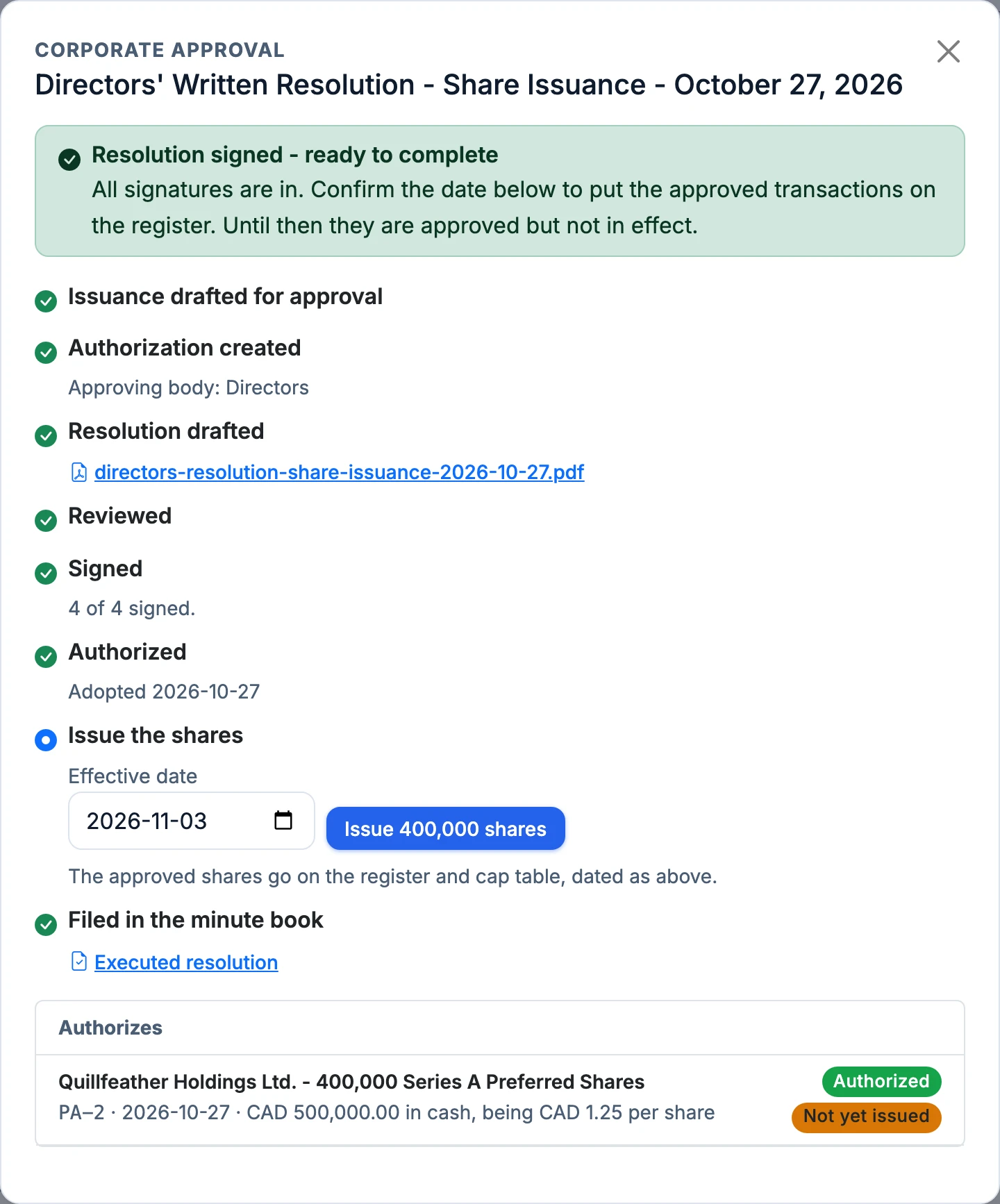
A signed resolution, ready to complete. The issuance stays "Not yet issued" until you click the button.
The effective date starts as today
The completion date is the date the transaction takes effect, and it defaults to the day you complete it, not to the date you typed on the original form. If the shares should be issued as of the resolution date, change the date before you complete.
If the resolution was signed outside Octelligence
Use Approved outside Octelligence on the approval panel when the directors signed on paper or in another system. Enter the date it was signed and, if you have it, choose the signed copy from Corporate Records. Otherwise record a manual confirmation. The resolution is then treated as adopted, and you complete the transaction as above.
If you need to start again
Cancel draft withdraws a resolution nobody has finished signing. Share issuances created with Approve first, then issue are cancelled with it, because their certificates were never issued. Transactions that already took effect go back to needing authorization.
Stages you'll see
The same stage names appear on the approval panel, on the transaction, and on Authorization Records.
| Stage | What it means | What to do |
|---|---|---|
| Draft - not sent | The resolution is drafted, and nobody has been asked to sign it. | Review and send |
| Awaiting signatures | Sent; some signers haven't signed yet. | Manage signatures to remind signers or change them |
| Declined by a signer | A signer declined, which ends that signature request. | Review and resend |
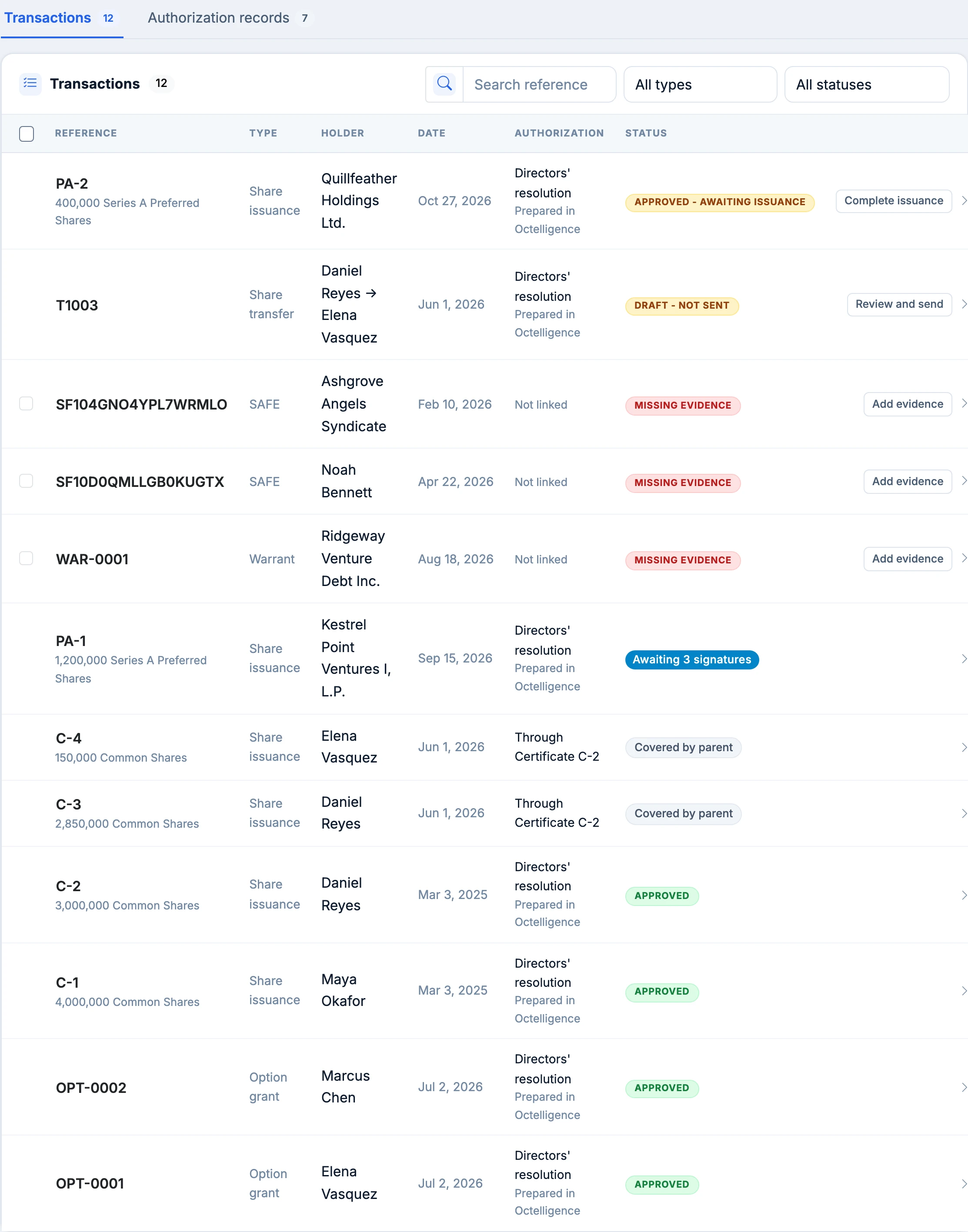
| Approved - awaiting issuance | Every signer has signed. The shares aren't issued until you complete it. Other transactions show Approved - not yet effective. | Complete issuance, or Complete |
| Approved and issued | Approved and in effect. Other transactions show Approved and completed. | Nothing. |
| Cancelled | The draft was cancelled. | Nothing. |
Approving several transactions with one resolution
When several transactions need the same approval, such as a batch of grants or the issuances from a round, approve them together.
Select the transactions
Open Governance › Authorization Records. On the Transactions tab, tick each transaction to include.
Prepare one resolution
Choose Approved by and the Resolution date, then click Prepare resolution.
The resolution date is the date the resolution is adopted. Each transaction keeps its own date, even if the resolution approves it after the fact.
Recording evidence for a transaction that's already in effect
Transactions created with Already approved, or record the approval later, and those brought in by import, show as needing authorization until you record how they were approved. Open the transaction on Governance › Authorization Records and choose one of:
- Prepare authorization: draft a resolution from the transaction's details, then review it and send it for signature.
- Link existing authorization: point to a resolution already in Corporate Records. It counts as on file straight away.
- Upload authorization document: attach a signed approval you hold elsewhere. It also counts as on file straight away.
- Record manual confirmation: state that the approval exists without a document. Octelligence stores your confirmation; it doesn't check it.
Historical transactions
When you bring in transactions that happened in the past, choose Issue now, approve after or Already approved, or record the approval later. Both keep the date you enter on the form. Under Approve first, then issue, the transaction's date is the one you enter when you complete it.
What Octelligence does, and what it leaves to you
Octelligence:
- drafts the resolution from the transaction's details and files it in Corporate Records;
- sends it for e-signature and collects the signatures;
- marks the resolution adopted when the last signer signs, and files the signed copy;
- keeps an approve-first transaction off the register until you complete it;
- lists every transaction and its approval stage on Authorization Records.
You decide:
- which body must approve and who must sign. Octelligence suggests signers from the directors on record but doesn't apply your articles, by-laws or a unanimous shareholder agreement;
- whether a manual confirmation or an uploaded document is genuine;
- when the transaction takes effect.
Limits
- Signing alone doesn't complete an approve-first transaction. Someone has to complete it, and the effective date defaults to that day.
- Every signer you list must sign. There's no quorum or majority rule, and a single decline ends the request.
- Octelligence doesn't email you when the last signature arrives. Check the approval panel or Authorization Records.
- The approval choice appears only when you create a transaction, not when you edit one.
- A SAFE waiting for approval is a draft, and the cap table's fully diluted figure already counts draft SAFEs. Pending share issuances, option grants and warrants don't count until they're completed.